
12 Hidden QuickBooks Mistakes Costing Shopify Sellers Money
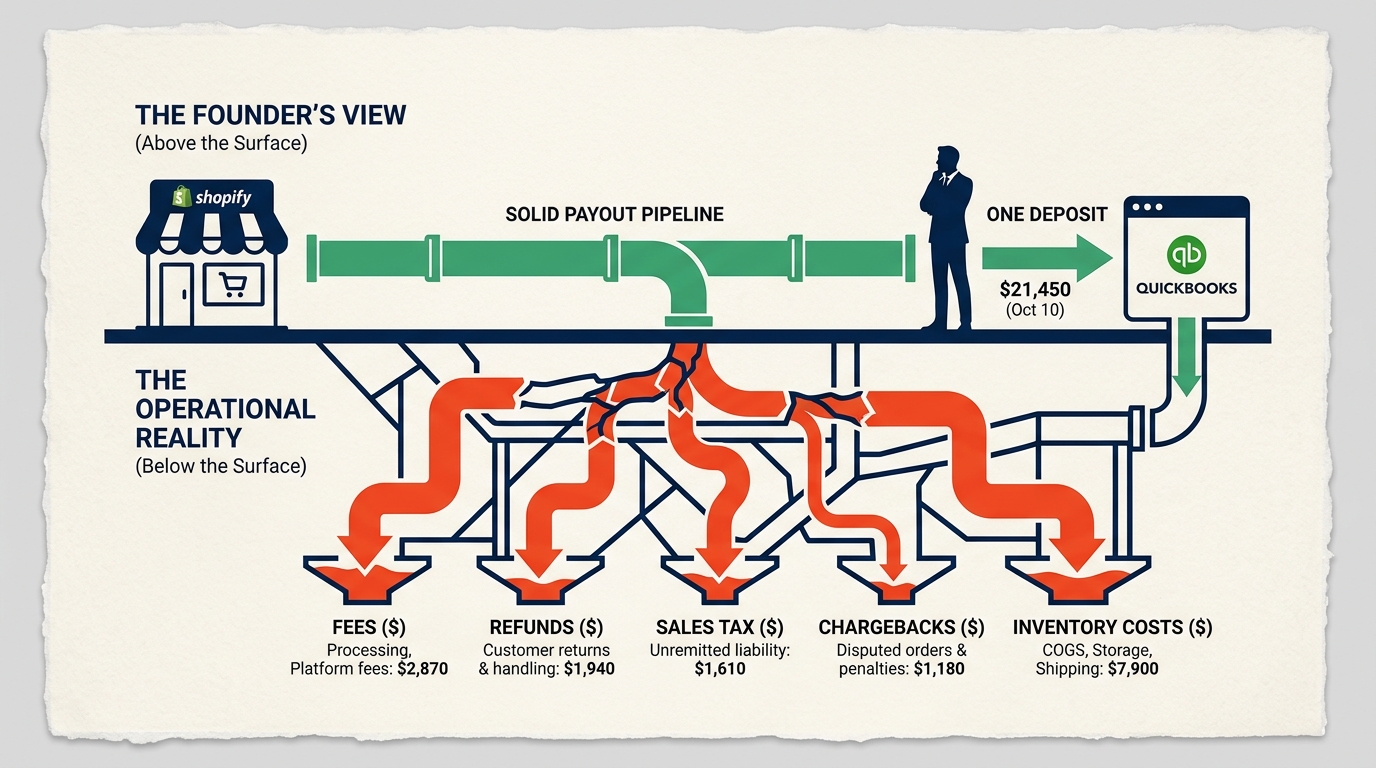
A Shopify store can be doing two million dollars a year and still have books that are completely wrong. Not because someone is stealing from the business. Not because QuickBooks is broken. The founder isn’t careless either. The real reason is simpler and a lot more common: Shopify and QuickBooks were never built to talk to each other on their own, and almost nobody sets up the structure that makes them work together correctly.
Shopify thinks in orders. QuickBooks thinks in journal entries. Every few days, Shopify sends one lump deposit to your bank account, and that single number is hiding gross sales, processing fees, refunds, chargebacks, sales tax, and gift card liability all mixed together. When that deposit gets coded as if it were simple revenue, the books look fine on the surface and fall apart underneath.
We’ve gone through the books of hundreds of Shopify sellers, and the same twelve mistakes keep showing up. Seven-figure brands, eight-figure brands, businesses with an in-house bookkeeper, businesses with an outside CPA. It doesn’t matter how experienced the accountant is if they don’t know Shopify’s data model specifically, because this isn’t a general accounting problem. It’s an ecommerce problem.
Here’s a number that should stop you for a second: more than seventy percent of the DIY Shopify books we review have problem number one on this list. If you’re running a store doing a million to three million a year, fixing twelve months of bad books like this typically runs six to twenty thousand dollars, and that number only goes up the longer the mistake sits there. So let’s get into what these twelve problems actually are, what they cost, and what to do about each one.
PROBLEM ONE: TREATING YOUR SHOPIFY DEPOSIT AS YOUR REVENUE
This is the single most common mistake in Shopify accounting, and it’s the one that quietly wrecks every report your business produces after it. Every few days, Shopify drops a deposit into your bank account, and the instinct is to treat that number as your sales. It isn’t. By the time that money lands in your account, Shopify has already pulled out processing fees, refunds, chargebacks, and sales tax. A bookkeeper, or even a default QuickBooks bank rule, will often code that net deposit straight to “Sales Revenue,” and from that exact moment forward, the books are structurally broken.
Here’s what that looked like for one DTC skincare brand doing two million a year. Their bookkeeper coded every Shopify deposit directly to revenue for eighteen straight months. QuickBooks ended up showing one point seven eight million in revenue. Shopify’s own Finances Summary showed two point oh four million in actual gross sales. That gap caught the attention of the IRS, which sent a CP2000 notice demanding an explanation for the two hundred sixty thousand dollar difference.
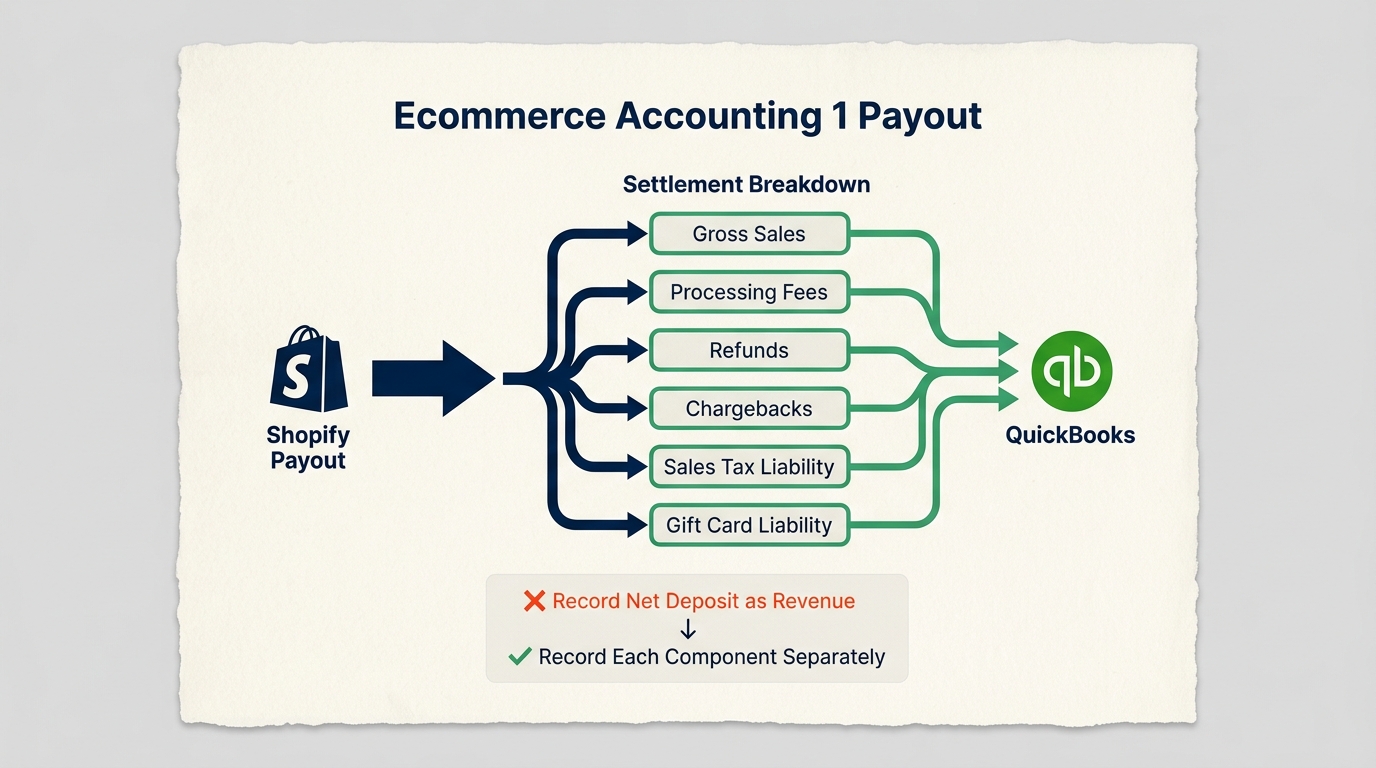
None of that missing money was fraud. It was sixty-two thousand in processing fees, ninety-eight thousand in refunds, twelve thousand in chargebacks, and eighty-eight thousand in sales tax, all stripped out before the deposit ever hit the bank, and never recorded anywhere as a separate line item. The founder had no idea those costs had grown that large, because the books made them invisible.
The warning signs are easy to spot once you know what to look for. Your QuickBooks revenue lines up suspiciously well with your bank deposits instead of your Shopify Finances Summary. Your fee accounts sit near zero despite real order volume. There’s no clearing account anywhere for Shopify Payments. And when you actually compare your P&L to your Shopify reports side by side, the numbers don’t match.
This is exactly where the tax exposure starts to compound, because Shopify sends the IRS a 1099-K based on gross sales, not net deposits. If your books show net and the IRS has gross on file, that mismatch is permanent until someone fixes it, and a CP2000 letter is often the first time a founder even learns the problem exists.
The fix is a Shopify Payments clearing account, a temporary holding account in QuickBooks that receives every component of a payout before it gets split out correctly: gross sales, refunds, processing fees, sales tax, and gift card liability, each landing in its own account. Tools like A2X, Synder, or Webgility automate this breakdown so you’re not doing it by hand. Without that clearing account, reconciling Shopify to QuickBooks isn’t difficult. It’s mathematically impossible.
PROBLEM TWO: YOUR INVENTORY COSTS ARE WRONG, OR THEY'RE NOT THERE AT ALL
Gross margin is the number that decides almost everything else in a product business, and if your cost of goods sold is wrong, your margin is wrong, your net income is wrong, and every decision built on top of those numbers is wrong, too. This shows up in a few different ways. Some sellers never turn on inventory tracking in QuickBooks, so the cost of goods never even reaches the P&L. Others record inventory purchases as an immediate expense instead of an asset, which makes costs spike the month they reorder and look artificially clean every other month. And almost every seller who imports products internationally forgets landed cost: the freight, duties, customs fees, and packaging that can tack on another fifteen to thirty percent over what the supplier invoice says.
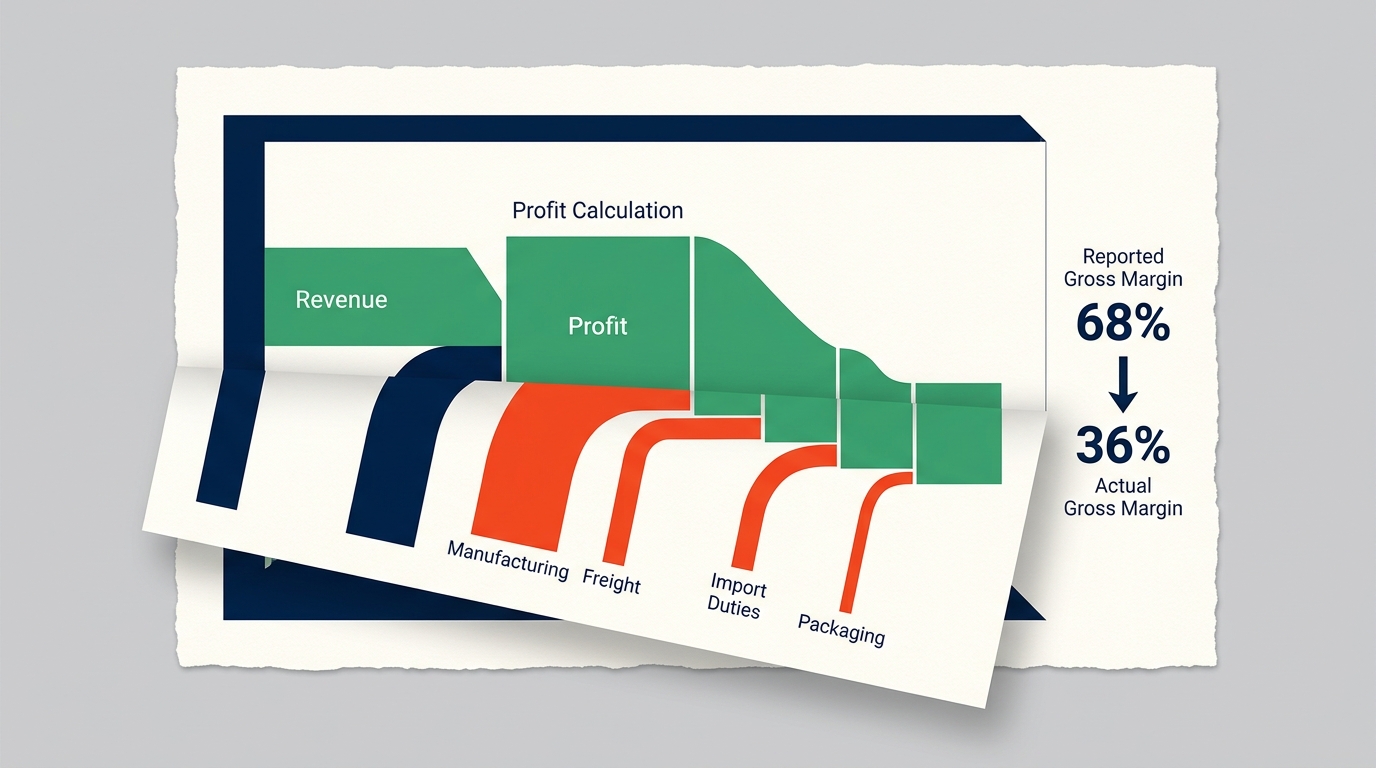
A five-million-dollar Shopify apparel brand learned this the expensive way. Their P&L showed a sixty-eight percent gross margin, a number healthy enough to justify aggressive ad spend, new product launches, and new hires. What had actually happened was their Shopify-to-QuickBooks integration synced order revenue but never synced cost data. Revenue was accurate. The cost of goods simply never posted. When their accountant finally dug into true landed cost, including manufacturing, freight, and import duties, it came out to three point two million against five million in revenue. Real gross margin was around thirty-six percent, not sixty-eight, and every decision the business had made for two years had been built on a margin that didn’t exist.
If your physical product business is showing an eighty percent margin or higher, that’s a flag worth taking seriously. So is a cost of goods percentage that swings more than ten points month to month with no clear operational reason, or an integration that syncs orders but never had product costs entered into QuickBooks in the first place. Bundles make this worse because a gift set or starter kit sold as one SKU needs the true component cost of everything inside it, and most sellers just guess, usually on the optimistic side.
Fixing it means giving every inventory item a real landed cost, not the supplier price, but the full cost to get one unit into your warehouse, and booking purchases to an Inventory Asset account rather than straight to cost of goods. Cost of goods should only post when a sale actually happens, and your inventory balance in QuickBooks should get reconciled against a physical count at least once a quarter.
PROBLEM THREE: YOUR CHART OF ACCOUNTS WAS NEVER BUILT FOR ECOMMERCE
When you set up QuickBooks, it hands you a default chart of accounts designed for a law firm or a consultant, not for a brand juggling multiple payment gateways, gift card liability, sales tax across dozens of states, freight costs, platform fees, and a return rate that hits both revenue and cost of goods at the same time. Most e-commerce sellers start with that default and just patch it as problems come up, which eventually produces reports that look clean and mean almost nothing.
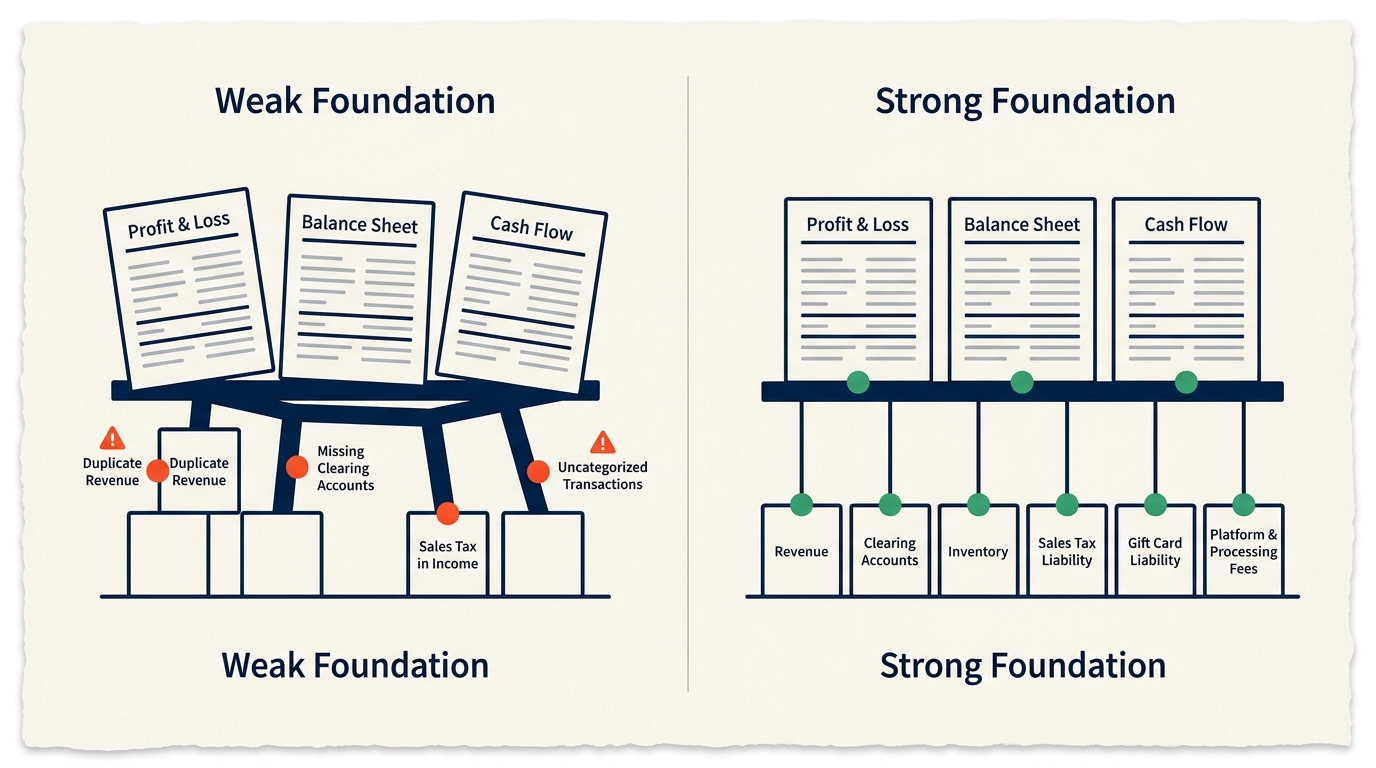
You’ll often find three different accounts all functioning as some version of “Sales Revenue.” Platform fees are buried inside the cost of goods, where nobody can see them. Sales tax is sitting in an income account instead of on the balance sheet, where it belongs. Processing fees that never show up anywhere at all. The warning signs are right there if you know where to look: duplicate sales accounts, empty fee accounts, sales tax mixed into income, no clearing accounts for any processor, and a balance sitting in Uncategorized Income or Uncategorized Expense.
Think of your chart of accounts as the skeleton holding up every report your business runs on. If that skeleton is built wrong, your P&L is wrong, your cash flow statement is wrong, and your balance sheet is wrong, no matter how carefully every individual transaction gets entered.
A properly built Shopify chart of accounts needs a separate clearing account for every payment processor you use, income accounts that split product sales from shipping income, contra-revenue accounts for discounts and returns, a Gift Cards Outstanding liability, a Sales Tax Payable liability, and expense accounts that separate platform fees, processing fees, shipping, fulfillment, and ad spend by channel. This takes a few hours to build properly and saves hundreds of hours of confusion down the road.
PROBLEM FOUR: SALES TAX YOU DON'T KNOW YOU OWE
Sales tax is where a lot of Shopify founders are sitting on exposure they don’t even know exists. There are over thirteen thousand taxing jurisdictions in the United States, and since the Supreme Court’s 2018 Wayfair decision, states can require you to collect sales tax based purely on how much you’re selling there, with no physical presence required. Most states set that threshold at one hundred thousand dollars in sales or two hundred transactions a year, which means a growing Shopify brand typically trips that wire in three to ten states within two years of real scale.
QuickBooks makes this worse in two specific ways. First, plenty of integration setups dump sales tax collected from customers straight into a revenue account instead of a liability account, which means your revenue looks bigger than it really is, and the money you owe each state is completely hidden. Second, even sellers who do track the liability correctly often have no idea which states they’ve triggered nexus in, and have never registered, collected, or sent a single dollar to those states.
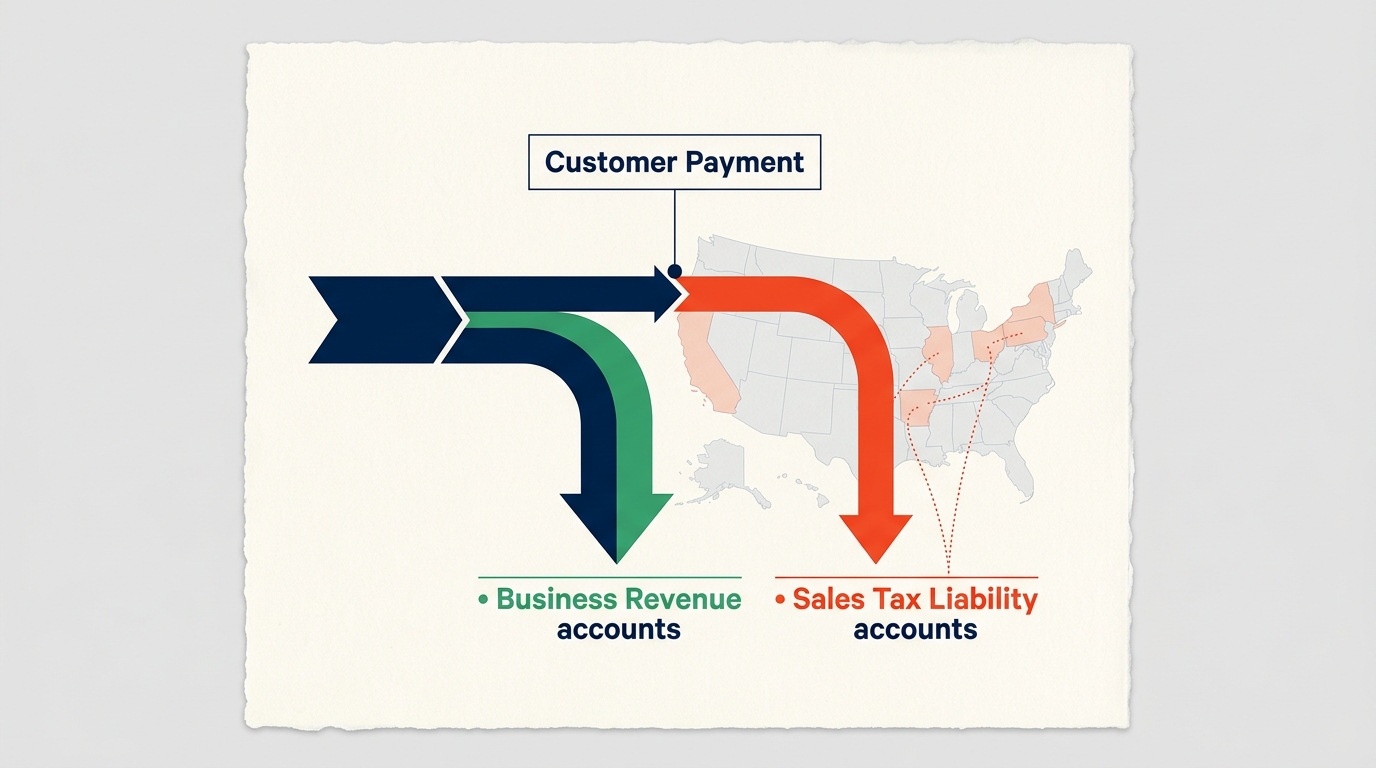
If there’s no Sales Tax Payable account anywhere on your balance sheet, or that balance hasn’t moved despite real sales volume, that’s the warning sign. So is never having run a nexus review, or not using TaxJar, Avalara, or something similar to track thresholds state by state.
There’s one distinction that trips up a lot of sellers. As of January 2025, Shopify automatically collects and remits sales tax for orders placed through the Shop App in every state that has sales tax. That coverage stops there. If a customer checks out through your own Shopify storefront, you are still the seller of record, and you’re still on the hook for registration, collection, and remittance in every state where you have nexus. Most Shopify revenue runs through the storefront, not the Shop App, so this protection covers far less than founders assume.
Back-tax exposure usually runs three to four years, sometimes six, with penalties of five to twenty-five percent on top of what you owe, plus interest. There’s a program called a Voluntary Disclosure Agreement that limits how far back a state can go and often waives penalties entirely, but it’s only available before the state contacts you first. Once an audit starts, that door closes.
The fix starts with mapping every dollar of sales tax collected to a Sales Tax Payable liability account, never to income, and using a tool like TaxJar or Avalara to track thresholds and automate filing across states. Run a nexus review once a year, and if you’ve been selling at real scale for over a year without ever checking this, bring in a sales tax specialist before a state finds you instead of the other way around.
PROBLEM FIVE: YOUR P&L IS LYING TO YOU BECAUSE OF CASH BASIS ACCOUNTING
QuickBooks defaults to cash basis accounting, and for a tiny operation tracking a handful of transactions, that’s fine. For a Shopify brand doing real volume, cash basis gives you a P&L that describes what happened in your bank account, not what’s actually happening in your business, and that gap shows up in two specific places.
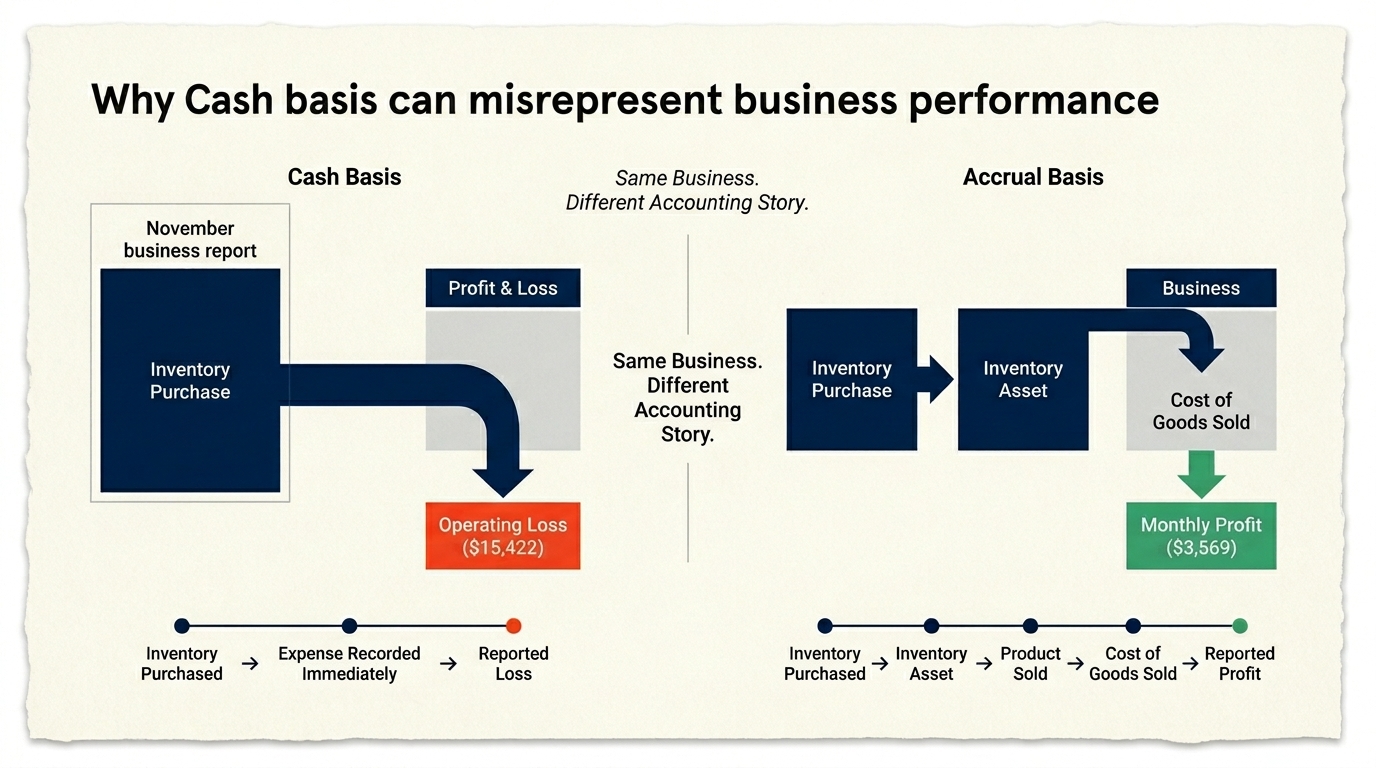
The first is inventory. Buy four hundred thousand dollars of product in November under a cash basis, and that whole amount hits your P&L as an expense in November, even though none of it has been sold yet, and it’s really sitting in your warehouse as an asset. The second is payout timing. A Shopify payout covering sales from August twenty-eighth through September fifth might not land in your account until September sixth, which means cash basis books that entire stretch of August revenue into September instead.
A four-million-dollar supplement brand felt this directly. They placed a four-hundred-thousand-dollar inventory order in November for the holiday season, and cash basis accounting turned that into an eighty-thousand-dollar operating loss on the November P&L. The founder came close to canceling their biggest holiday marketing push based on that number alone, which would have torched their best quarter of the year. In reality, November’s contribution margin was positive. That four hundred thousand dollars was an asset waiting to be sold, not a cost that should have hit that month at all. Run the same month on an accrual basis, and November shows a healthy profit instead of a disaster.
The warning signs show up as gross margin that swings more than ten points month to month with no clear cause, big losses in the exact months you placed a large inventory order, no Inventory Asset account on the balance sheet at all, and an accountant who has never once brought up accrual accounting or IRS Form 3115.
The fix is converting to accrual accounting: inventory purchases go onto the balance sheet as an asset, cost of goods only hits the P&L when a sale actually happens, and revenue gets recorded when it’s earned, not when cash lands. Gift cards and any prepaid products get their own Deferred Revenue account. Switching methods does require filing Form 3115 for the year of the change, which your accountant handles, and the upfront work is real, but the clarity it buys you afterward is worth every bit of it.
PROBLEM SIX: MULTIPLE PAYMENT GATEWAYS THAT NEVER ACTUALLY RECONCILE
Shopify Payments, on its own, is fairly easy to reconcile. The moment you add PayPal, Stripe, Klarna, Afterpay, or Sezzle on top of it, the problem multiplies, because every one of those gateways settles on its own schedule, charges its own fees, and deposits to your bank independently of all the others.
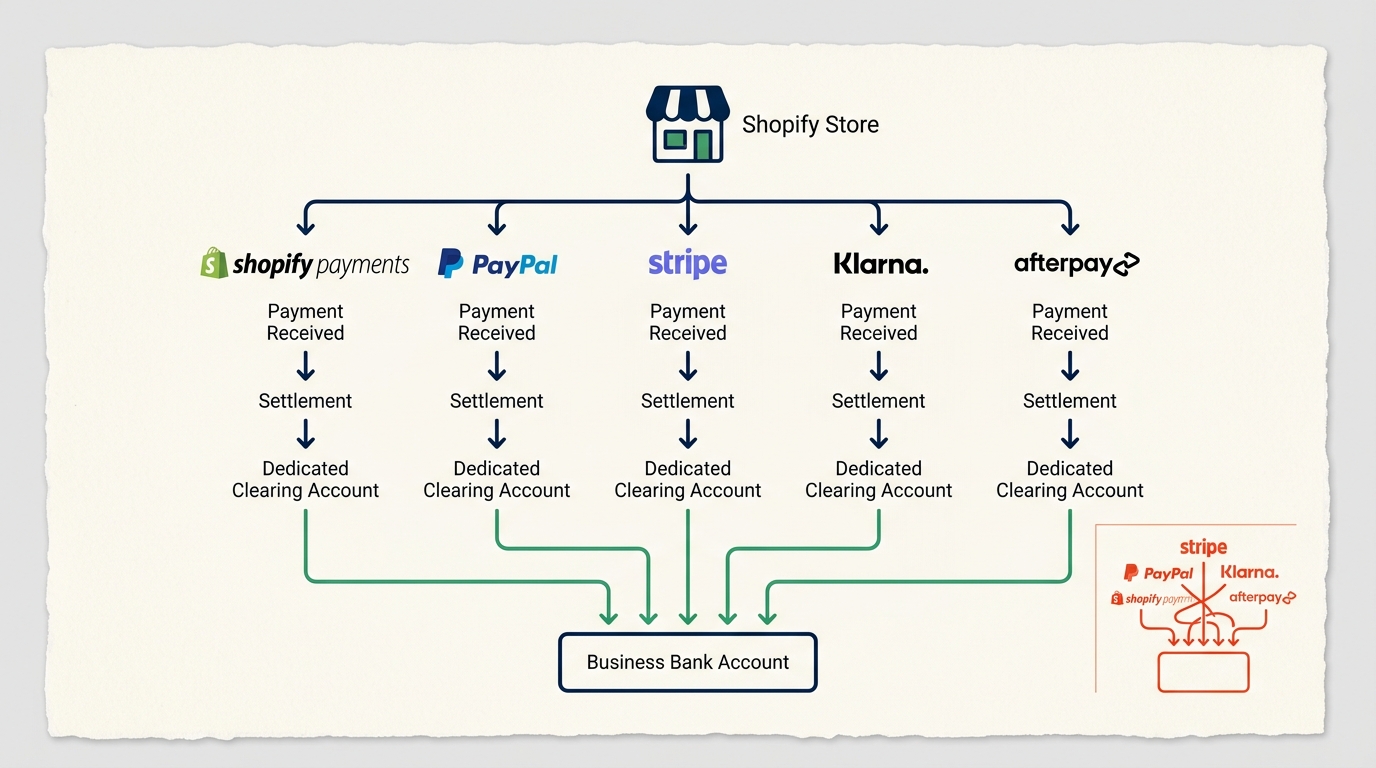
Here’s the most common version of this mistake: a bookkeeper connects PayPal directly as a bank feed in QuickBooks. That feed shows gross transaction amounts, before PayPal takes its cut. Your actual bank account shows net amounts, after the fee. Those two numbers will never match, which means the month-end close fails every single time, assuming the bookkeeper is even paying close enough attention to notice the gap.
There’s a second fee hiding in here that almost nobody accounts for. Shopify charges an extra transaction fee, anywhere from half a percent to two percent, on every order that runs through a gateway other than Shopify Payments. Run thirty percent of your orders through PayPal on the Basic plan, and you’re paying somewhere around four point four to four point nine percent total on each of those transactions, a cost that most sellers don’t even know exists and almost no set of books tracks separately.
If your PayPal, Stripe, or Klarna deposits are coded straight to revenue instead of a clearing account, if there’s no separate fee account for each gateway, or if month-end reconciliation never fully closes because gateway deposits don’t line up with income entries, that’s this problem showing up in your books right now.
The fix is giving every payment processor its own clearing account: Shopify Payments Clearing, PayPal Clearing, Stripe Clearing, Klarna Clearing, all separate. Sales post to each clearing account at the gross amount, and the net settlement transfers to your operating bank as a clean transfer that closes the loop. For BNPL providers holding rolling reserves, you’ll want sub-accounts that separate available balance from the held reserve, and each gateway should get reconciled monthly against its own statement, on its own, not lumped in with the others.
PROBLEM SEVEN: GIFT CARDS THAT ARE QUIETLY INFLATING YOUR REVENUE
Gift cards seem simple until you actually look at what’s happening underneath. Sell a customer a hundred-dollar gift card, and you’ve collected a hundred dollars in cash, but you have not earned a hundred dollars in revenue. What you’ve actually taken on is a hundred-dollar obligation to deliver product later. Until that card gets redeemed, that hundred dollars belongs on your balance sheet as a liability, not on your P&L as income.
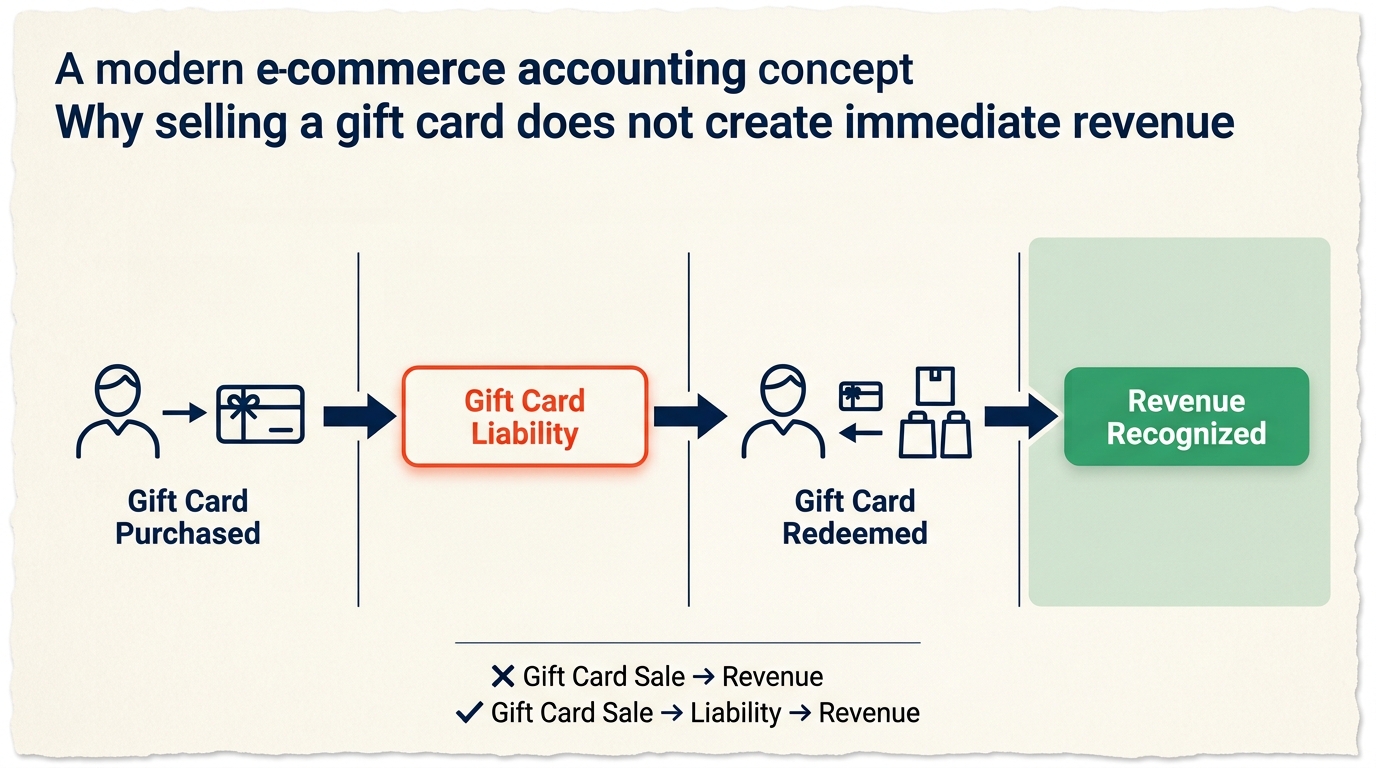
Almost every basic Shopify-to-QuickBooks connector gets this wrong, including Intuit’s own native connector. The system sees cash come in and pushes it straight to a revenue account, which means if you’ve sold any meaningful volume of gift cards over any meaningful stretch of time, your revenue is overstated by however much of that balance hasn’t been redeemed yet.
A six-million-dollar home goods brand discovered this the hard way. They’d sold two hundred eighty thousand dollars in gift cards over three years, and QuickBooks had recorded all of it as revenue the moment each card sold. Actual redemptions only came to one hundred ninety thousand. That left ninety thousand dollars of overstated revenue sitting in the books with no liability anywhere on the balance sheet to offset it. When acquisition talks started, the buyer’s accounting team caught it in the first week of due diligence, demanded a restatement covering three years of financials, and the deal closed six weeks late at a reduced purchase price. A ninety-thousand-dollar accounting error ended up costing far more than ninety thousand dollars in deal value.
If there’s no Gift Cards Outstanding account on your balance sheet, if gift card sales show up anywhere on your income statement instead of as a liability, or if the balance in Shopify’s own Gift Card Liabilities report doesn’t match what’s sitting in QuickBooks, that’s this problem in your books. Store credit issued as a refund alternative runs through Shopify’s gift card system, too, and a lot of sellers find that showing up as income instead of as a refund without realizing it.
There’s also a legal angle most sellers never think about. Most states have escheatment laws that require businesses to hand over unclaimed gift card balances to the state after three to five years of inactivity, so a gift card program that’s been running for years without anyone tracking the liability or watching escheatment thresholds may carry a state compliance obligation nobody’s addressed yet.
The fix is a Gift Cards Outstanding liability account that every gift card sale gets mapped to instead of income, with redemption triggering the entry that debits the liability and credits revenue at the moment the card actually gets used. Reconcile that balance monthly against Shopify’s own Gift Card Liabilities report, and if you’ve been selling gift cards for more than a couple of years, look into your state’s escheatment rules before someone else does.
PROBLEM EIGHT: PROFIT NUMBERS YOU CAN'T ACTUALLY TRUST
Everything up to this point has been a mechanical error. This one is what happens once you start making real business decisions based on reports built on top of those mechanical errors.
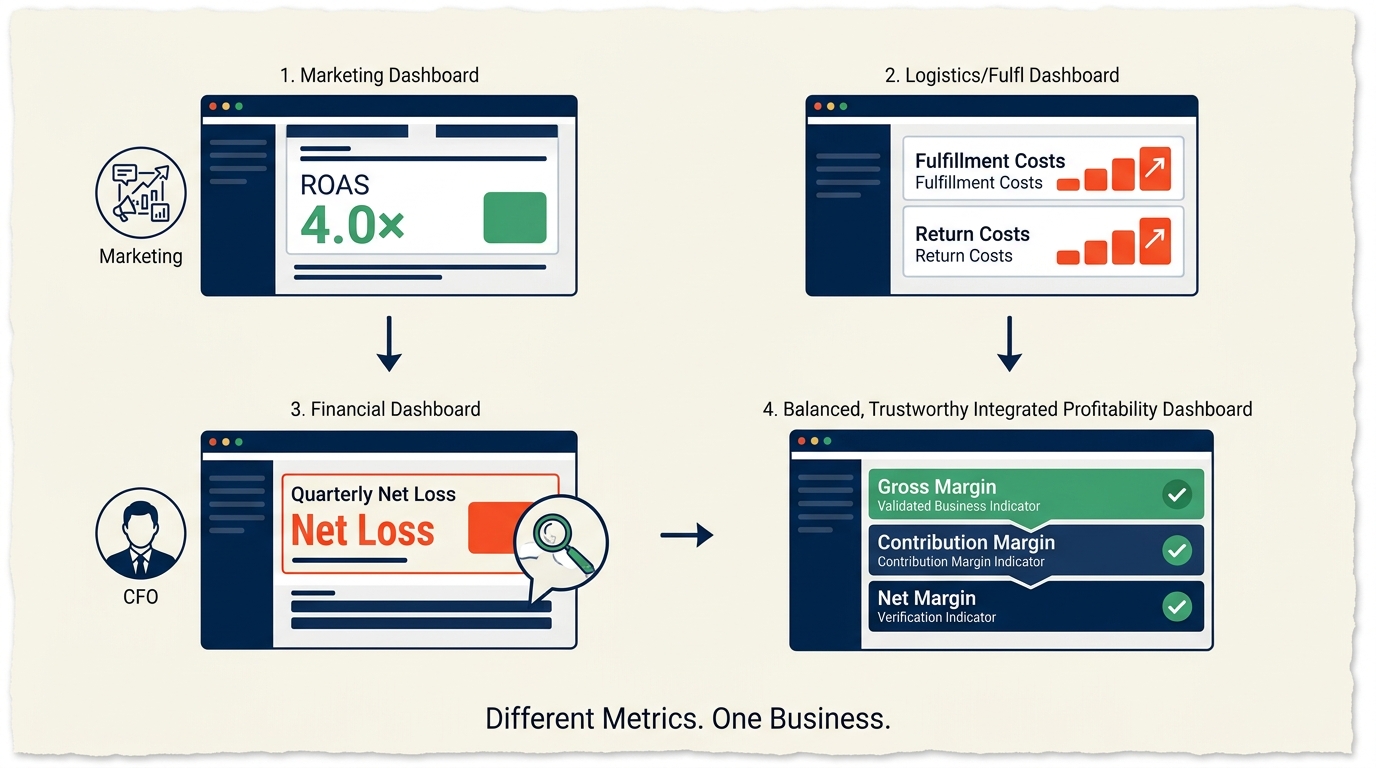
The dangerous version of this problem doesn’t look broken at all. It looks like a perfectly reasonable P&L that happens to be wrong in the same direction every single time. Your gross margin shows fifty-eight percent when the real number is forty-one. Your best-selling product looks profitable until you actually layer in fulfillment costs, return rates, and gateway fees, at which point it’s margin-negative. Your marketing team is reporting a four-times return on ad spend while your CFO is staring at a quarterly loss, and the uncomfortable part is that both of them are right, because they’re each looking at a different, incomplete slice of the same business.
Your marketing team can report a four times return on ad spend while your CFO is looking at a loss for the same quarter, and for a lot of Shopify brands, both of them are telling the truth. That’s the actual problem.
This happens because the system that captures your revenue, Shopify, and the systems holding your cost data, your inventory, and fulfillment tools don’t talk to each other automatically. Cost of goods lags by weeks. Shipping costs show up thirty to forty-five days after the product ships. Promotional discounts get calculated after the fact. Put it all together, and you typically end up with an eight-to fifteen-point gap between the margin your dashboard shows and the margin your business is actually running at.
The tell is when your QuickBooks margin looks meaningfully different from what you’d calculate by hand using Shopify data and supplier invoices, or when you’ve quietly built your own spreadsheet because you don’t trust the QuickBooks number anymore. It’s also there when your P&L looks great every November and terrible every January for no clear operational reason, or when you’re running multiple channels through one blended P&L with zero visibility into which channel is actually carrying the business.
The fix is building three layers into your reporting instead of one: gross margin, which is revenue minus cost of goods; contribution margin, which subtracts variable costs like fulfillment, gateway fees, and returns; and net margin, which subtracts fixed overhead and ad spend on top of that. QuickBooks Class tracking lets you assign every transaction to a channel, Shopify DTC, Amazon, retail, B2B, so you get a real P&L per channel instead of one number hiding all of them. Reconcile that P&L against the Shopify Finances Summary every single month, and treat ROAS as one input feeding into contribution margin, never as a standalone measure of whether something’s actually profitable.
PROBLEMS NINE THROUGH TWELVE: THE COMPOUNDING ISSUES
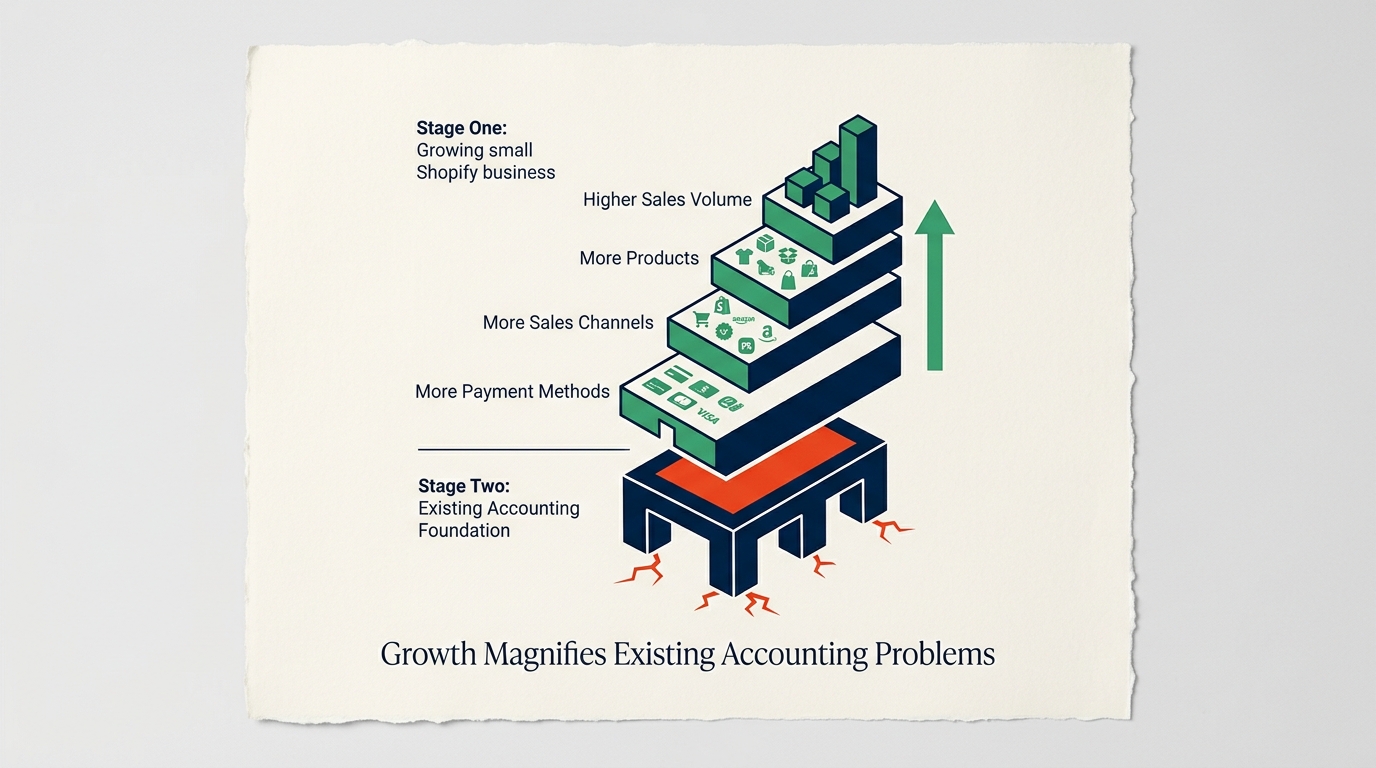
The first eight problems do the most structural damage to your reporting. These next four are still real money, and they’re showing up more often as Shopify stores grow, add new payment methods, and expand what they sell.
PROBLEM NINE: REFUNDS THAT DON'T ACTUALLY REVERSE EVERYTHING THEY SHOULD
Online retail return rates average above twenty percent, which means refund accounting isn’t a minor footnote; it’s a real factor in your revenue, your cost of goods, your inventory value, and your cash flow. Most Shopify setups handle this only partway.
When a customer sends back a hundred fifty dollar order, three things need to happen in QuickBooks at the same time: the hundred fifty in revenue reverses, the cost of goods for that product reverses, which restores inventory value, and the product goes back into your inventory count. Most basic integrations only handle the first step. Revenue reverses, a credit memo gets created, and the cost of goods just sits there inflated while your inventory stays understated as if the return never happened at all.
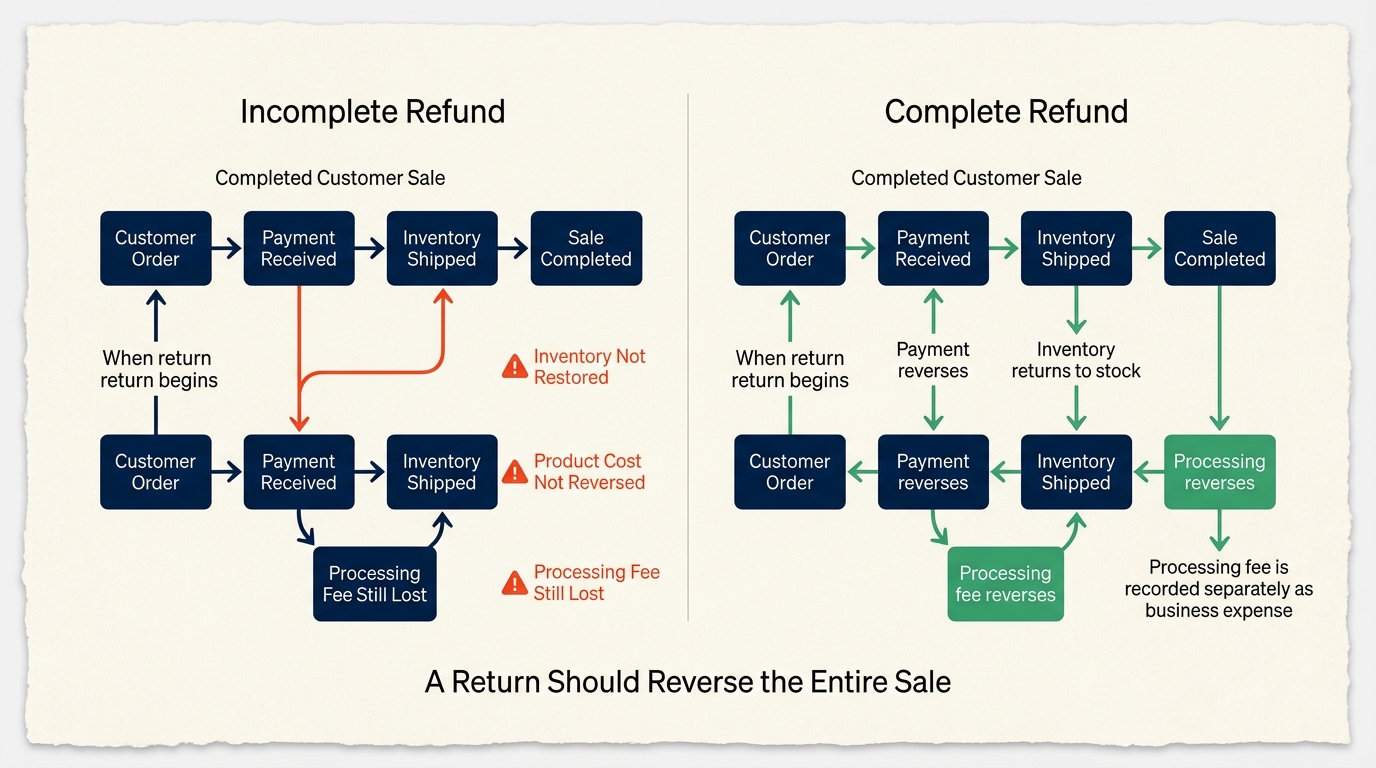
There’s a fee buried in this, too, that almost nobody captures. When you refund a customer, Shopify Payments keeps the original processing fee, typically two point nine percent plus a fixed amount, even though the sale got reversed. That’s a real cost sitting on your books uncategorized, and across a full year of returns at a twenty percent rate, those uncaptured fees add up to a meaningful expense that most founders never even know exists.
The fix is an integration that handles the entire refund lifecycle: revenue reversal, cost of goods reversal, inventory restock, and a separate line for that non-refundable processing fee. Track your return rate monthly as its own contra-revenue metric, and if January’s P&L looks terrible every single year, check whether post-holiday returns are landing without the cost of goods reversals from the original November and December sales that they’re connected to.
PROBLEM TEN: BUY NOW PAY LATER SETTLEMENTS THAT NEVER MATCH WHAT YOU RECORDED
Buy Now Pay Later has become a real payment method for Shopify stores selling higher-ticket items, and Klarna, Afterpay, Affirm, and Sezzle together crossed fifty billion dollars in US volume in 2025. Some brands are seeing fifteen to twenty-five percent of their orders go through BNPL, and the accounting for these providers works nothing like a standard credit card, which breaks most QuickBooks setups without anyone noticing right away.
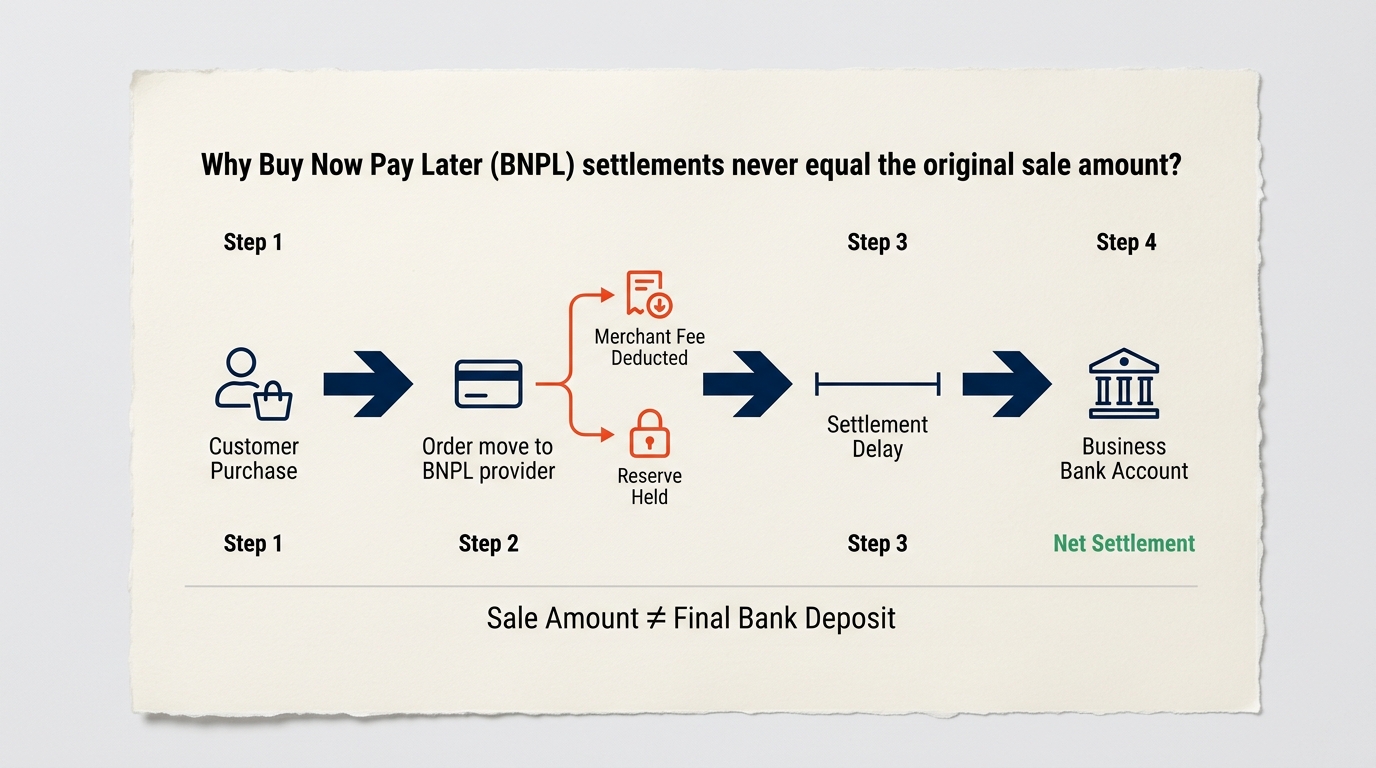
Three things make BNPL different. Settlement is delayed, with Klarna typically paying weekly or every other week, and Affirm settling faster but holding back reserves. Most BNPL providers hold five to ten percent of every transaction as a rolling reserve for ninety to a hundred eighty days as protection against chargebacks and fraud, and that reserve sits on the provider’s balance sheet, not yours, though most sellers either don’t know it exists or mistake it for missing cash. And BNPL merchant fees run four to six percent of order value, well above card processing, deducted straight from the settlement instead of being billed separately.
What that means in practice: your books show revenue from a Klarna sale, your bank shows a settlement weeks later for a different number entirely, and the gap is fees plus reserves. No clearing account, no reserve sub-accounts, no dedicated BNPL fee account, and reconciliation simply never works, while the 1099-K Klarna sends the IRS showing gross transactions creates the exact same underreporter exposure you saw in problem number one.
The fix treats each BNPL provider as its own sub-ledger with its own clearing account, including separate sub-accounts for available balance versus held reserves. Record gross sales the moment the order happens, and when the provider settles, transfer the net into your operating bank while recording the difference as BNPL fee expense. Reconcile that clearing account monthly against the actual BNPL merchant statement.
PROBLEM ELEVEN: CONFUSION OVER WHO ACTUALLY OWES THE SALES TAX
This one has gotten more complicated over the past two years, and plenty of sellers are still working off assumptions that are out of date. Since January 2025, Shopify’s Shop App counts as a marketplace facilitator in every US state with sales tax, meaning Shopify collects and remits automatically on those orders, and you owe nothing further on Shop App purchases specifically. That protection stops the second a customer checks out through your regular storefront instead. On your own site, you’re still the seller of record, fully responsible for registration, collection, and remittance everywhere you have nexus.
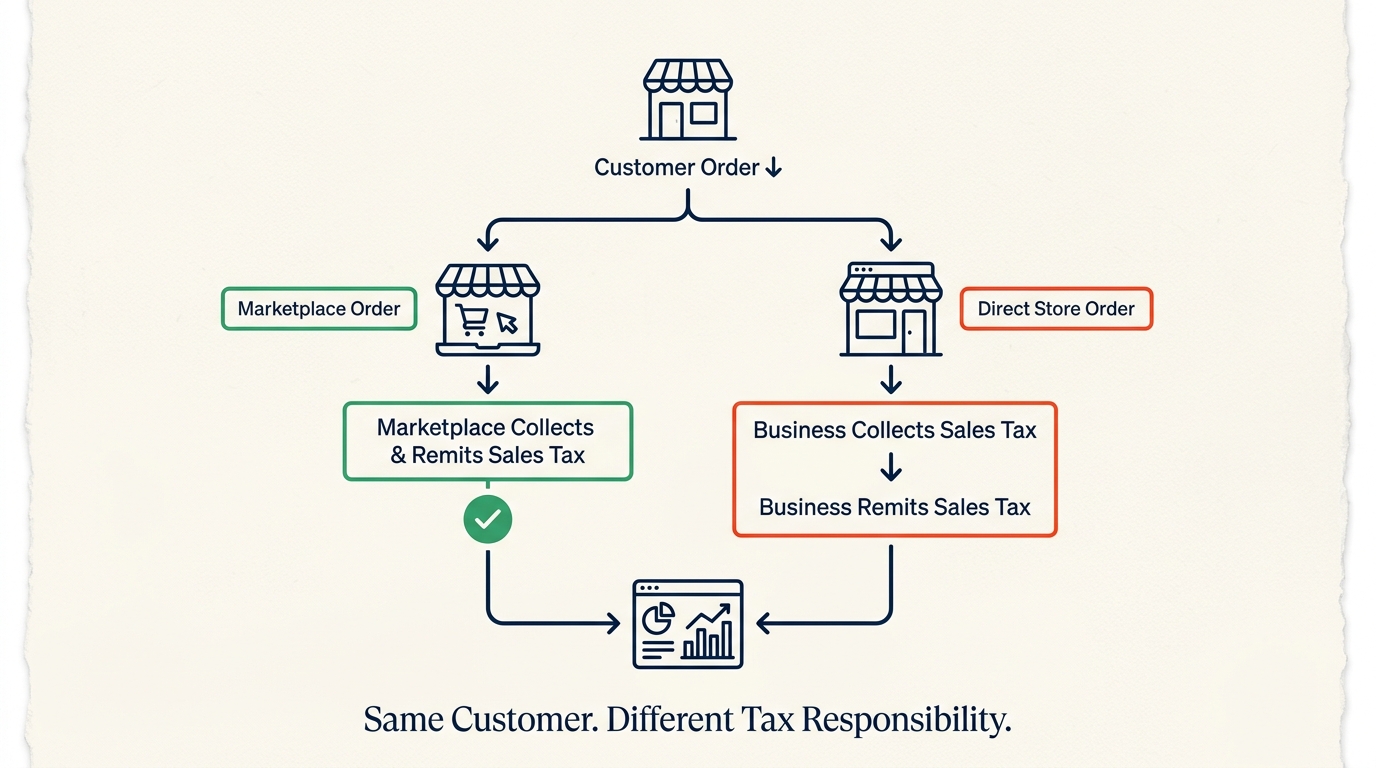
Sellers running Amazon, Etsy, or Walmart Marketplace alongside Shopify add another layer to this. Amazon and Etsy handle collection and remittance for sales made on their platforms, but none of that coverage extends to your Shopify store. A founder who assumes Amazon is handling all their tax because they use FBA, while their Shopify DTC channel keeps growing, is quietly racking up unregistered nexus obligations in every state where that direct store has crossed the hundred thousand dollar threshold.
In QuickBooks, this shows up as a double-counting problem if you’re recording the full sales tax on Shop App orders as a liability you still owe, when Shopify has already remitted it, or the opposite problem if direct-store sales tax never shows up as a liability at all. Either way, payouts stop matching recorded liabilities and reconciliation breaks.
The fix is mapping Shop App sales to a separate account, or using an integration that automatically strips marketplace-facilitated tax out of your sales tax payable balance, while keeping separate nexus tracking just for direct-store sales. Confirm the facilitator status of every channel you sell on, and check it again every year, because these rules keep changing.
PROBLEM TWELVE: CHARGEBACKS THAT DISAPPEAR INTO YOUR PAYOUT WITHOUT A TRACE
Chargebacks get deducted silently from your Shopify payout. The original sale stays recorded on your books exactly as it was. The revenue reduction from the chargeback doesn’t show up anywhere, and the fifteen-dollar dispute fee Shopify charges on every chargeback, whether you win or lose, vanishes into the net payout number with no accounting entry at all.
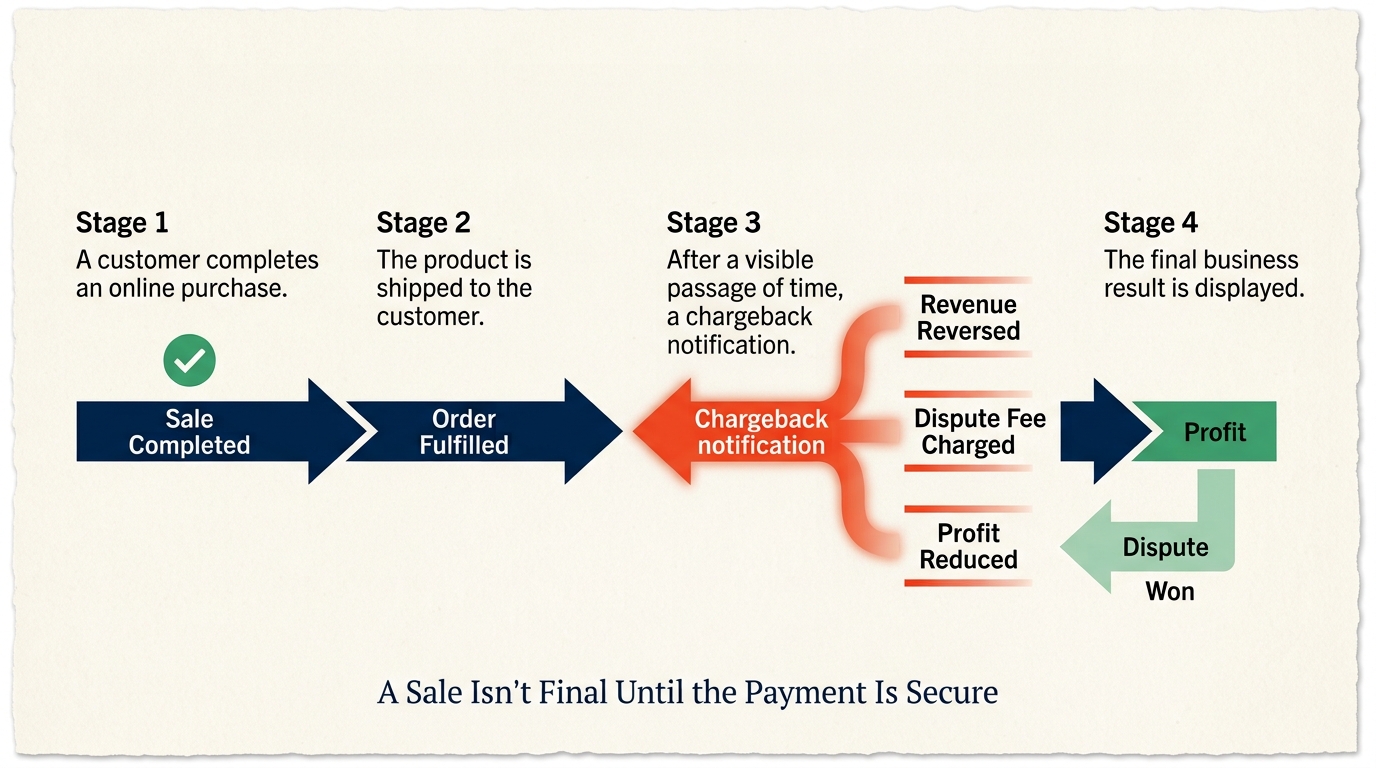
For most sellers, chargebacks land somewhere between half a percent and two percent of gross merchandise value. On a three-million-dollar brand, that’s fifteen to sixty thousand dollars a year of lost revenue still sitting on the books as earned income. It gets worse when you consider that inventory shipped for a lost chargeback still carries its cost of goods, which means you’re holding an expense with no matching revenue at all, pulling your real margin further away from what the reports show.
Won disputes create their own confusion in the other direction. Win a chargeback, and the disputed amount gets reinstated to your payout. If the original loss was never recorded in the first place, that reinstatement looks like a surprise windfall, when really it’s just money you’d already counted once before.
The fix is two dedicated QuickBooks accounts: Chargeback Losses and Chargeback Fees. When a chargeback gets filed, record the disputed amount as a pending reversal. If you lose it, finalize the loss and book that fifteen-dollar fee as an expense. If you win it, reverse the entry. And if your chargeback rate climbs above one percent, that’s worth an operational review on its own, because sustained high rates are exactly what gets processors to restrict or shut down accounts entirely.
WHEN THESE PROBLEMS STOP BEING SOMETHING YOU CAN IGNORE
Every problem on this list is fixable while your business is running normally day to day. What changes the math is what happens when someone outside your business finally looks closely at your books.
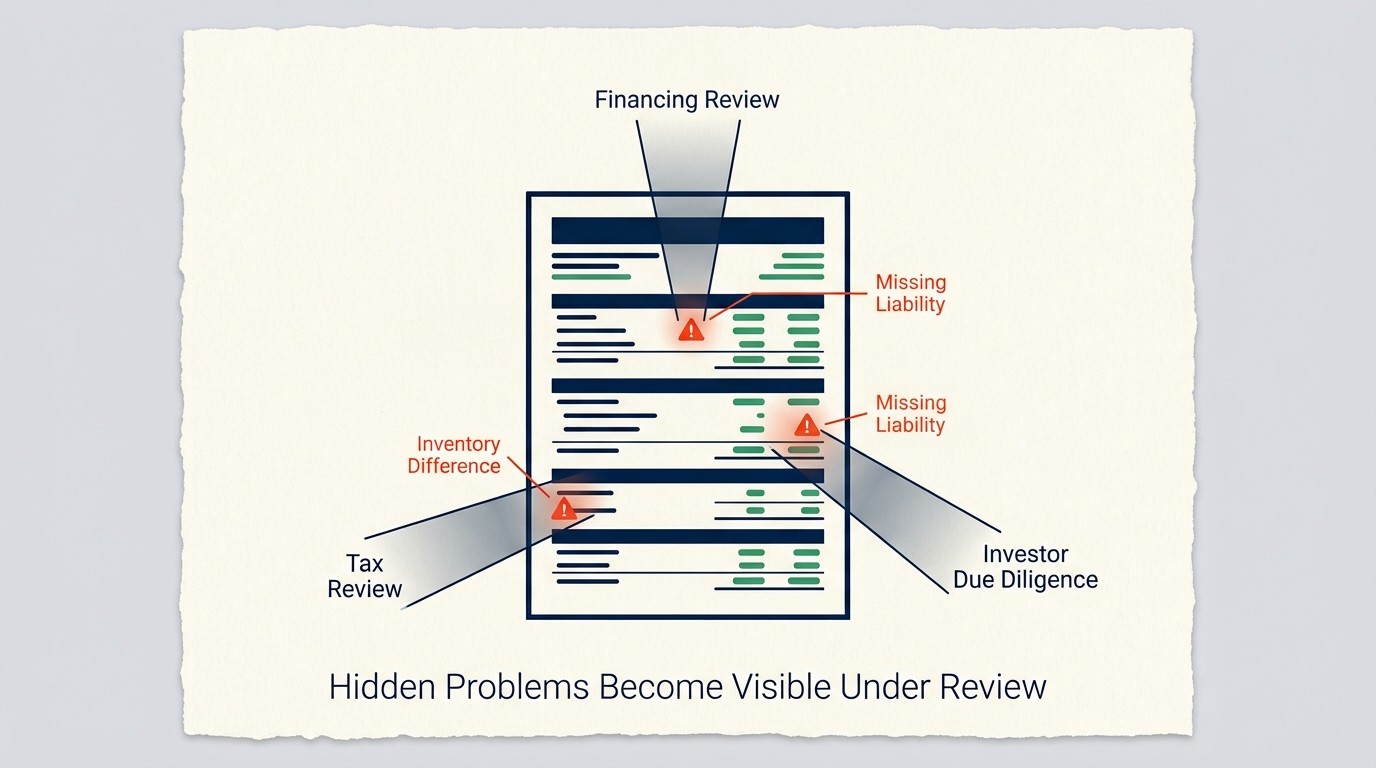
A loan application is one of those moments. SBA lenders, bank underwriters, and private credit funds will pull your QuickBooks P&L, your balance sheet, and your tax returns and lay them side by side. Show three point two million in revenue on your books against three point eight million on your 1099-K, and you will be asked to explain that six hundred thousand dollar gap during underwriting. If your inventory on the balance sheet doesn’t match your tax return, the lender either discounts that asset’s value or declines the application outright.
A fundraise or an acquisition puts even more pressure on the numbers, because buyers and investors typically spend twelve to twenty-four months reviewing your financials. They will find every gift card liability that isn’t on your balance sheet. They will catch every state where you’ve crossed a nexus threshold and never registered. They will reconcile your payout reports against QuickBooks line by line, and whatever they find reduces deal value, extends timelines, forces expensive restatements, and sometimes kills the deal entirely. We’ve personally seen a deal get delayed six weeks over a ninety-thousand-dollar gift card liability that was missing from the balance sheet, an error that would have cost roughly two thousand dollars to fix if someone had caught it proactively.
An IRS notice is the most common way this surfaces involuntarily. Shopify’s 1099-K reports your gross platform sales to the IRS directly. If your QuickBooks revenue comes in materially lower because you’ve been booking net deposits instead of gross, the IRS system flags it automatically and generates a CP2000 underreporter notice. Responding to that notice eats up documentation, professional time, and often penalty payments, and for a lot of founders, that letter is the first time they learn the problem has been sitting there for years.
WHAT CLEANUP ACTUALLY COSTS
The question we hear most from founders who’ve just found one of these problems in their own books is simple: What’s it going to cost to fix this? The honest answer depends on how long the problem ran and how much volume it touched, but here’s the realistic range based on what we actually see.
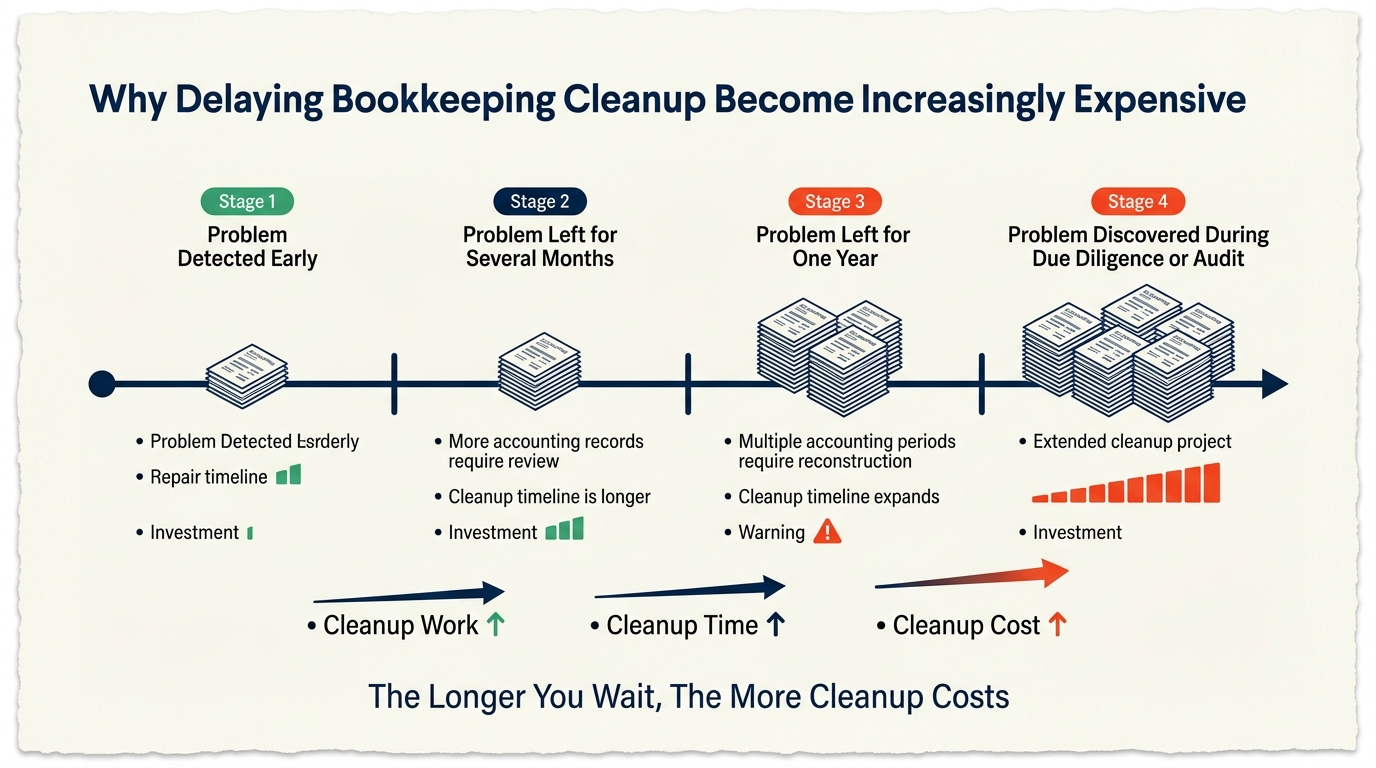
A business doing five hundred thousand to a million in revenue is typically looking at three to six thousand dollars to clean up six months of books, taking two to four weeks. At one to three million in revenue, that’s six to twelve thousand dollars for twelve months of cleanup, running four to eight weeks. At three to ten million, the range moves to ten to twenty-five thousand dollars across twelve months, taking six to twelve weeks. And at ten million plus, cleanup typically runs twenty to fifty thousand dollars or more, covering twelve months of books over three to six months of work.
This usually surfaces during a reconciliation review, and by the time most founders notice it on their own, the books are already months behind. These costs only grow with time, because transaction history gets harder to reconstruct as platforms purge old data, and the longer a structural problem runs, the more months there are to clean. Catching this proactively, before a loan application, an acquisition, or an IRS notice forces the issue, is always cheaper than fixing it under pressure.
WHY THIS KEEPS HAPPENING
Most Shopify accounting disasters don’t start as disasters. They start as shortcuts. A bookkeeper experienced with service businesses connects a Shopify store to QuickBooks and codes deposits as revenue, because that’s how it works for every other client on their roster. A founder sets up QuickBooks themselves and uses whatever default chart of accounts is sitting there, because it’s already there, and it seems reasonable enough. An integration tool gets connected because it’s free, and it handles most of what people need, even though it never syncs cost data. A gift card promotion launches because it’s a great way to bring in new customers, and nobody stops to set up the accounting behind it.
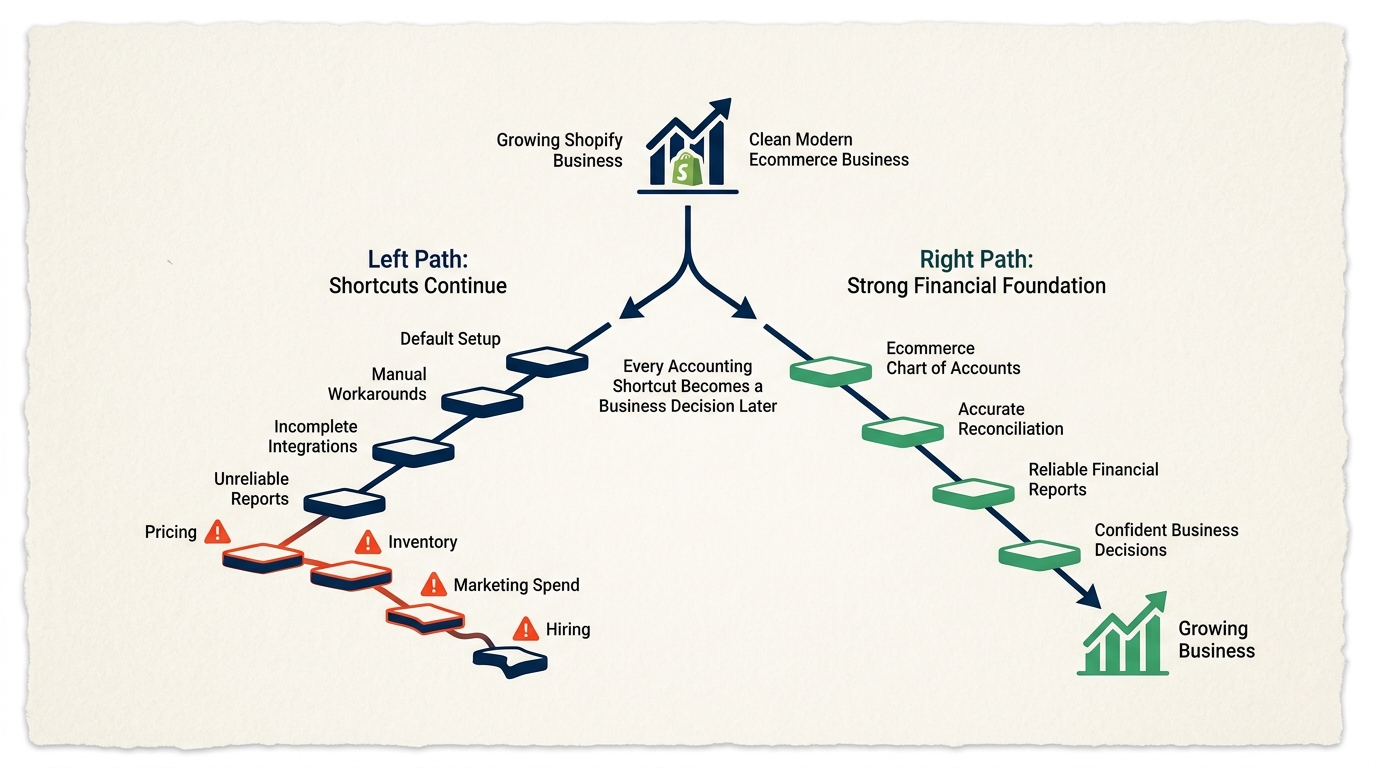
None of that is negligence. It’s the natural result of ecommerce businesses moving fast, paired with accountants who aren’t specialists in exactly how Shopify’s data model works. The real problem is that every one of these shortcuts compounds. The wrong chart of accounts produces the wrong P&L. The wrong P&L drives the wrong pricing, the wrong marketing spend, and the wrong hiring decisions. By the time someone who actually knows what they’re looking at finally reviews the books, months or years of decisions have already been made on numbers that were never accurate to begin with.
The real danger here isn’t the accounting error itself. It’s treating that error as just the cost of doing business and continuing to make major calls based on reports that were never built to be trusted in the first place.
If you saw your business in two or three of these problems, what you have is a bookkeeping problem. If you saw it in five or more, what you actually have is a decision-making problem, one that’s shaping your pricing, your inventory purchasing, your marketing spend, and whatever you’re planning for the next twelve months right now, today.
Here’s the part that should make you feel better: every single problem on this list is fixable. The right chart of accounts can be built. The integrations that handle payouts, refunds, BNPL, and chargebacks correctly already exist, and they’re not expensive. A specialist who actually knows Shopify’s data model can rebuild twelve months of books in four to eight weeks. The only real question left is whether you find out about these problems on your own terms, or whether they surface for you during a loan underwriting, an acquisition review, or an IRS notice instead.
If any of this sounded familiar while you were watching, that’s worth taking seriously. GreenTarget Finance works exclusively with Shopify and ecommerce brands, and what we do is review your QuickBooks setup, find the structural problems in your chart of accounts and reconciliation process, and build the accounting foundation your business actually needs before you’re forced into needing it. If you’re not completely certain your books are accurate right now, that uncertainty is worth resolving, and a complimentary accounting review will show you exactly where things stand.