
Shopify Changed Its Inventory Reports in October 2026. Does Your Month-End Comparison Still Make Sense?
A Shopify inventory report can look perfectly normal and still tell a different story from the report you used last month.
That matters when a business is trying to explain why its stock numbers moved, whether replenishment decisions make sense, or why the inventory asset in QuickBooks does not appear to agree with its operations dashboard.
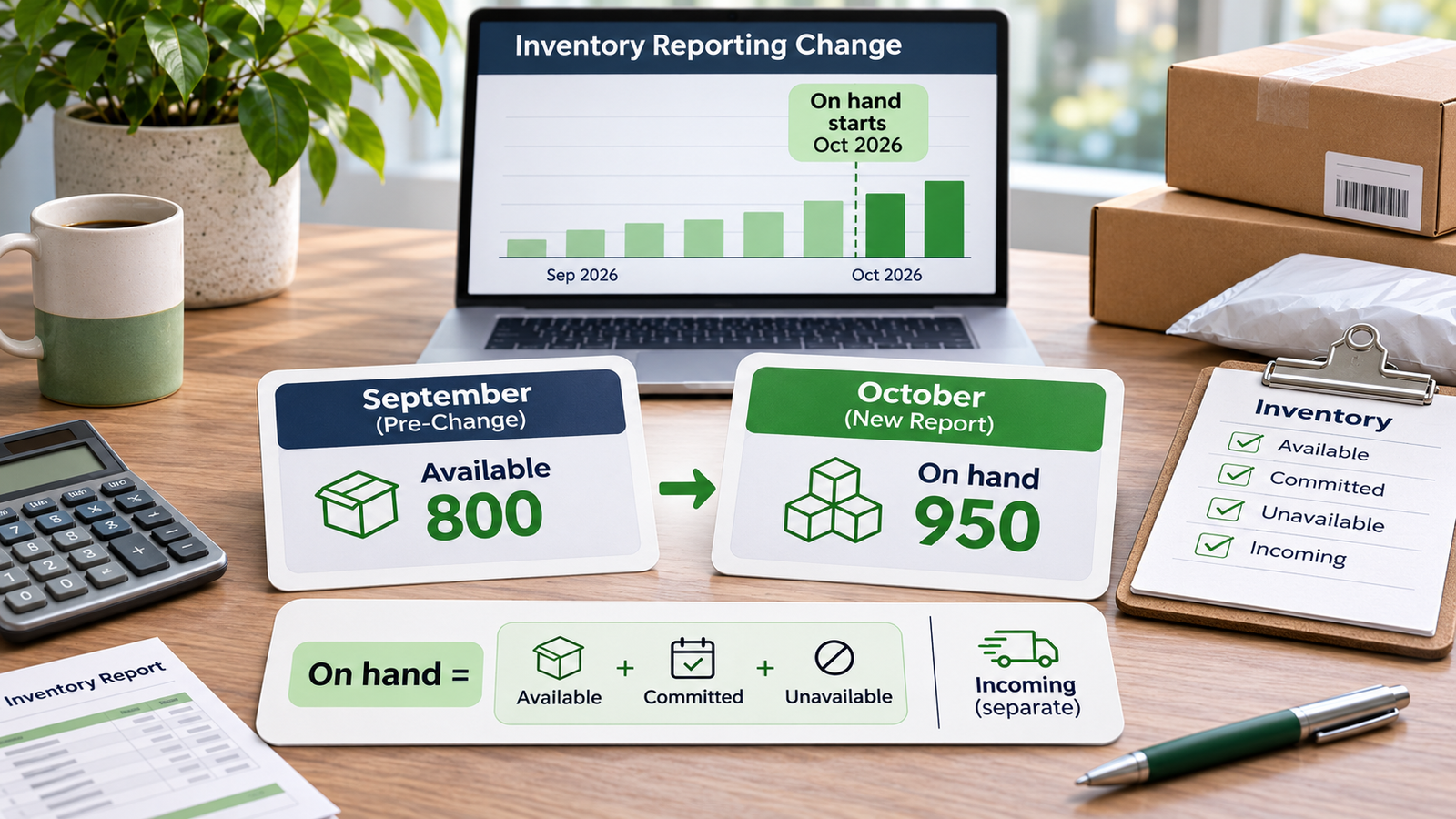
Shopify’s Help Center documents an important change effective October 1, 2026: inventory reports measure On hand quantity instead of Available quantity. Historical data before that date continues to display Available quantity. The two measures answer different questions.
This does not mean Shopify has changed your inventory accounting method. It means the operational measure shown in certain inventory reports has changed, and an unadjusted month-over-month comparison may no longer be like-for-like.
What changed on October 1?
According to Shopify’s inventory-report documentation, from October 1, 2026, the reports use On hand quantity rather than Available quantity. On hand includes units at a location that are Available, Committed or Unavailable. The pre-change historical figures remain based on Available quantity.
For an established store, the practical consequence is simple: a change in the reported figure may partly reflect a change in what is counted, not only a change in physical stock.
A finance team should document this definition break before using the report to explain inventory trends, stock turns or month-end variances.
On hand is not the same as available
Available inventory is the stock that can be sold under Shopify’s inventory-state rules. Committed inventory is associated with orders or other commitments and may not be immediately available for new orders. Unavailable inventory can include stock held aside for reasons such as quality control or other operational restrictions.
On hand is broader. Shopify’s Help Center explains that it includes Available, Committed and Unavailable units at a location, while incoming units on transfers are not included in that On hand measure.
These distinctions are operational, not just semantic. A warehouse may physically hold units that are already committed to customer orders. Those units can still exist at the location even though the business should not offer them for another sale.
If the store has meaningful committed or unavailable stock, a report based on On hand can be higher than one based on Available. A finance manager comparing September and October without noticing the changed definition could mistake that difference for newly received stock or an inventory-control problem.
Why September and October inventory reports are not directly comparable
Suppose an illustrative Shopify location has 800 available units, 120 committed units and 30 unavailable units at an October month-end. Its On hand count would be 950 units under these assumed states.
Assume, solely for this simplified comparison, that the same location held the same 800 Available, 120 Committed and 30 Unavailable units at both month-ends, with no intervening physical receipts, shipments, returns or other stock movements. September’s report would show 800 Available units, while October’s report would show 950 On hand units. The apparent 150-unit increase is entirely a measurement-basis difference under those assumptions, not newly received inventory.
That is a simplified illustration, not a claim about any particular merchant. Real stores also experience receipts, sales, returns, transfers, damage and adjustments. The point is to separate a reporting-definition change from genuine movement.
A useful management report should explicitly state which quantity basis it uses, the date range, and whether the comparison spans the October 1 change. If management needs a like-for-like trend, the team may need to reconstruct comparable Available or On hand figures from reliable underlying data, where available, rather than simply subtracting two report totals.
What about the inventory asset in QuickBooks?
Here is where operational reporting and accounting reporting need to be kept separate.
Shopify tracks quantities and, where configured, cost-per-item information. QuickBooks Online records inventory-related financial balances according to the business’s accounting setup, transactions, adjustments and costing treatment. A quantity count is not a dollar-denominated general-ledger balance.
Multiplying a Shopify quantity by a product cost field may provide a useful diagnostic estimate in some circumstances. It is not automatically a complete inventory valuation. A business may also need to consider goods in transit, warehouse locations outside Shopify, purchase cutoffs, landed costs, returns, damage, obsolete stock, and the costing policy applied in its accounting records.
Shopify’s Month-end inventory value report calculates Total inventory value by multiplying its Ending quantity by the configured Cost per item for each variant included in the report. That can support an operational valuation check, but it does not independently establish the inventory asset under the company’s accounting policies. Reconcile its scope, locations, ownership, cutoffs and costs with the inventory subledger and QuickBooks general ledger. Shopify also states that inventory metrics begin October 1, 2023; deleted locations do not appear in historical inventory reports; and product or variant deletions can affect the history shown. Document those limitations before reconstructing long-term comparisons.
For multichannel businesses, the gap can be wider. The same physical SKU might be stored in an Amazon FBA network, a third-party logistics warehouse and a Shopify-tracked location. A consolidated inventory balance needs a clear ownership and location map, with safeguards against counting the same units twice.
The objective is not to force QuickBooks to equal a Shopify screen by posting a plug adjustment. The objective is to understand what each source measures, reconcile the appropriate populations and investigate supported differences.
A practical month-end workflow
Start by saving the report exports and documenting the date, timezone, store, locations, filters and quantity basis. Retain the underlying report definition as part of the close documentation, especially when the month being reviewed crosses a known reporting change.
Next, build a movement bridge. Start with an opening quantity on a consistent basis, then trace purchases received, sales fulfilled, returns restocked, transfers, write-offs and other adjustments. A movement bridge is only meaningful if every component uses compatible units, locations and cutoff dates.
Third, review committed and unavailable stock separately. Ask whether large balances reflect open orders, delayed fulfillment, damaged inventory, quality holds or other operational conditions. These balances can be important for management decisions even when they are not themselves accounting adjustments.
Fourth, reconcile locations and ownership. Check that stock in Shopify is not being added again from another warehouse report. Identify goods in transit and clarify when the business has ownership under its purchase terms and accounting policy. Physical receipt and accounting ownership do not always occur at the same time.
Fifth, reconcile inventory value. Compare the supported inventory valuation or subledger to the relevant QuickBooks asset accounts. Investigate differences by SKU, location, transaction timing or costing assumptions where possible. Do not treat a report-total difference as proof of a missing journal entry.
Sixth, review cost of goods sold. Confirm that inventory reductions, sales recognition and COGS treatment follow the company’s accounting policy. Refunds and returns need particular care: a customer refund does not always mean an item was physically returned to sellable inventory.
Finally, record exceptions and assign owners. If the finance team cannot explain a material variance before the reporting deadline, document its amount, possible causes, evidence requested, owner, and expected resolution. Management should know which figures are final and which still have limitations.
What a controller should ask
An established store does not necessarily need a new dashboard every time a platform changes its reporting logic. It needs a repeatable process for interpreting the information.
A controller review might ask: Are September and October reports comparable? Which quantities are available, committed or unavailable? Which warehouses and channels are included? What supports the inventory asset in QuickBooks? Which variances are due to timing or definitions, and which require corrections? Have adjustments been reviewed and approved?
These questions help separate three different problems: a reporting-definition change, an operational stock discrepancy and an accounting misstatement. They may look similar in a high-level dashboard, but they call for different responses.
Frequently asked questions
Did Shopify change the accounting value of my inventory on October 1, 2026?
Not simply by changing an inventory report’s quantity definition. The accounting balance depends on the underlying transactions, inventory costing and accounting policies. Review your records rather than assuming a platform-report change creates a journal entry.
Why is On hand higher than Available?
On hand includes inventory states beyond stock available for sale, including committed and unavailable units, as defined in Shopify’s documentation. The size of the difference depends on the store’s actual inventory states.
Can I use Shopify’s month-end inventory value report as my QuickBooks reconciliation?
It can be one useful source, but it may not capture every location, ownership consideration, landed cost or accounting adjustment. Determine its scope and reconcile it with the appropriate inventory records and general-ledger balances.
What if we use A2X or Link My Books?
Settlement accounting integrations can help organize marketplace sales, refunds and fees. They do not, by themselves, prove that physical inventory quantities, inventory valuation and COGS are reconciled. Review the actual configuration and related inventory workflow.
The takeaway
Shopify’s October 2026 reporting change is a reminder that reliable financial reporting depends on definitions as much as numbers.
Before interpreting a sudden inventory movement, confirm whether the source is showing Available or On hand stock. Before adjusting QuickBooks, confirm that the populations, dates, ownership and costing are comparable. And before presenting the month-end results to management, make the unresolved differences visible.
GreenTarget supports established eCommerce businesses with recurring accounting, marketplace reconciliation, inventory and COGS review, month-end close and fractional controller oversight. If your operational reports and financial statements are telling different stories, we can discuss where the differences arise and what a reliable monthly review process should cover.
For help reconciling Shopify inventory and preparing reliable month-end reporting, explore GreenTarget Monthly eCommerce Accounting.
Reference: Shopify Help Center, Inventory reports, including the October 1, 2026 change and historical-data limitations.